
AI in To Bill
Some features of To Bill use Claude, the artificial intelligence models of Anthropic, in the United States. Here, in plain words, is what is sent to them, why, how long it is kept and how to switch AI off. This information meets the duty to inform of the Data Protection Act (art. 19 FADP, SR 235.1).
Version of this information: 12 October 2026.
In short
- Who
- Anthropic PBC, in the United States, with its Claude models. The model depends on the feature.
- What
- Only what the feature needs. The figures of your books and the Copilot leave without IBANs, AHV/AVS numbers, e-mails, phone numbers or people's names. Payroll stays out of AI unless you allow it. A file you hand to the AI leaves as it is.
- How long
- 30 days at most at Anthropic, then deleted. Your data is never used to train its models.
- How to switch it off
- AI is on by default. An administrator of your company switches it off at any time in Settings › AI.
Why AI?
To save you time: reading a receipt, proposing the right account, matching a bank line, explaining an anomaly, answering a question about your figures, preparing an import or a draft quote. AI suggests, you decide. One exception: the autopilot books a receipt on its own when your history or one of your rules confirms the proposal. You can undo the entry, or switch the autopilot off.
What is sent
Every AI helper depends on one switch, Settings › AI. Here is what each one sends.
The helpers that work on your books
Booking and categorising receipts, bank line proposals, the night check, explanations of checks, review of entries, summary and receipt request for your fiduciary. They send:
- ●Your figures: amounts, VAT, dates.
- ●Your chart of accounts and your categories.
- ●Cleaned-up descriptions, and the names of suppliers that are companies.
- ●Unmatched bank lines and the open invoices that might match them.
Removed before sending: IBANs, AHV/AVS numbers, e-mails, phone numbers, card numbers. People's names are replaced with a code.
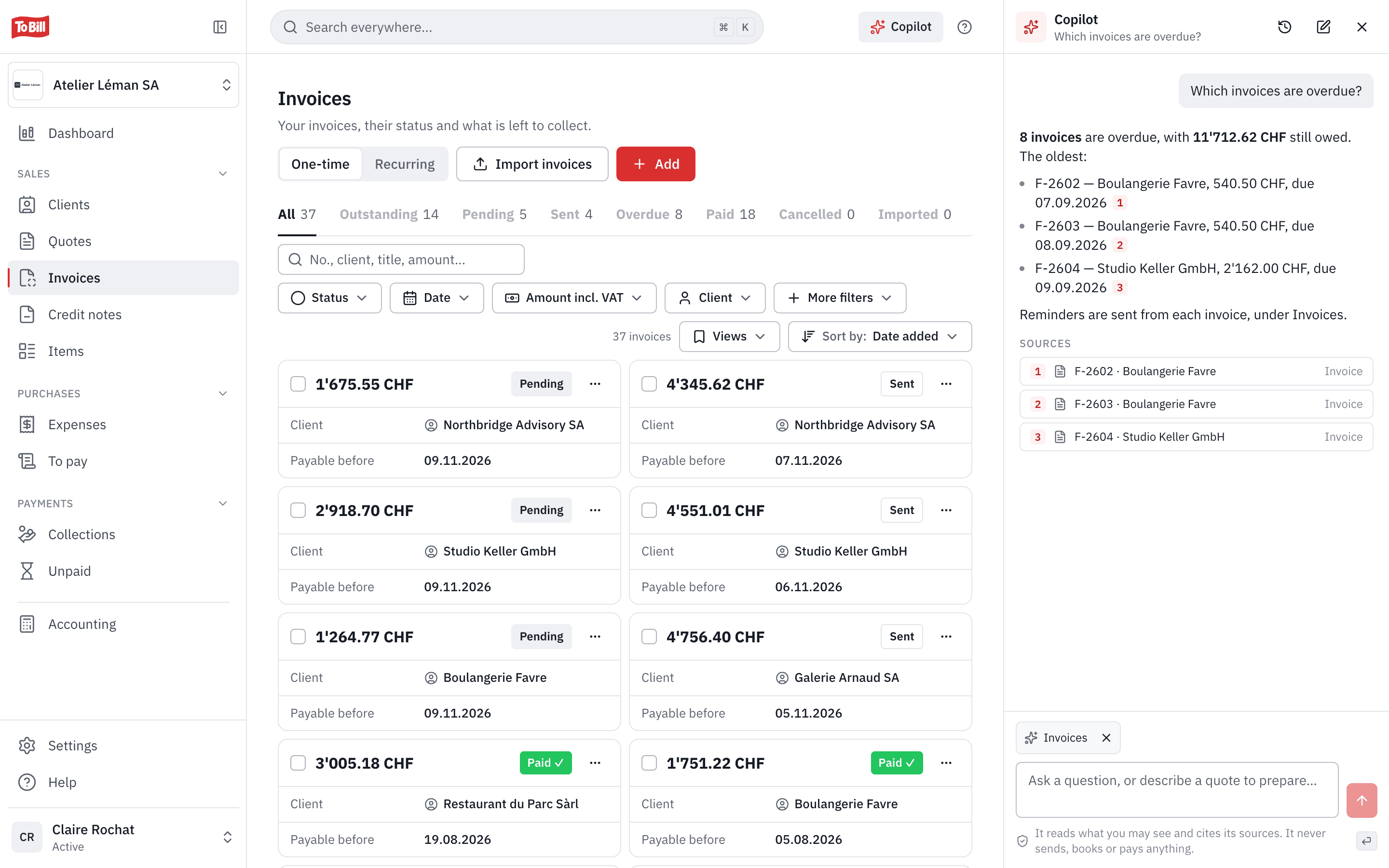
The Copilot
The side panel that answers your questions about your company's figures, cites its sources and, on request, prepares draft quotes and invoices. It reads only what you may see in To Bill, and cannot send, book or delete anything. It sends:
- ●Your question and the latest messages of the conversation.
- ●What it reads to answer you: references, amounts, dates, statuses, accounts, cleaned-up descriptions. Never your customers' contact details.
- ●For a draft: your company's name and town and the description of the work.
The names of customers, suppliers, employees and colleagues are replaced with a code; IBANs, AHV/AVS numbers, e-mails and phone numbers are removed. Your conversations stay at To Bill, only you can see them, and they are deleted after 180 days without a new question.
The helpers that read what you hand them
They send that content as it is, with everything in it:
- ●Reading a receipt, dropped into “To review” or attached to an expense (web and mobile app): the photo or PDF.
- ●Importing invoices already issued: the full PDF.
- ●Importing customers or items: the first 5 rows of your file (for customers: names, addresses, e-mails, phone numbers).
- ●Address too long for the QR-bill: the customer's address.
- ●Quote or invoice from a description, editor assistant: your text, your company's name and the customer's name.
- ●Layout template: your description of the style.
Payroll: only if you allow it
One switch, “AI for payroll” (Settings › AI, an administrator), off by default even when AI is on. It covers two uses:
- ●The Copilot reads the totals of each payroll run (gross, net, amount paid out, employer cost, number of employees), for the people who have access to payroll. Never a payslip, a name, church tax, absences, an AHV/AVS number or an IBAN.
- ●The draft of a work certificate: the job title, the tasks, your ratings and words, the months of entry and exit, the activity rate, the person's sex and the reason for leaving if it is to be stated. The name is replaced with a marker; never the salary or the AHV/AVS number.
As long as this switch is off, nothing from the payroll is sent.
What is never sent
- ✕Payslips and salary certificates, AHV/AVS numbers, withholding tax, church tax and absences, even if you allow payroll.
- ✕Salary payments on your bank statements and salary entries. Only totals, such as the balance of the salaries account, may leave.
- ✕Your passwords.
- ✕Your name and login e-mail.
- ✕The files in your Drive.
Except what is printed on a file you send yourself: a payslip dropped as a receipt would be read like any receipt.
How long it is kept
- At Anthropic: 30 days at most, then deleted. The only exception: content its checks flag as abuse may be kept for up to two years. Nothing is used to train its models.
- At To Bill: the result (amounts read, proposals accepted) is kept with your other data. Copilot conversations are visible only to their author and deleted after 180 days without a new question. The call log records the feature and the cost, never the content. Every switch of AI on or off is recorded: who, when, and the version of this information.
How to switch AI off
- 1Log in to app.tobill.ch with an administrator account.
- 2Open Settings › AI.
- 3Turn off “AI switched on”: nothing is sent any more. To switch off a single helper, open “Advanced settings”.
- 4So that nothing is booked without you, turn off “Book safe receipts on its own” under “Autopilot”.
Once switched off, AI stays off until an administrator switches it on again. Without AI, importing customers and items and reading the Swiss QR code keep working.